
Product Icon

Customer/Order/Coupon CSV Import Suite for WooCommerce

Import both customers and orders into WooCommerce from a CSV file.
Choose a billing option
$79
Save 20%
$158 $126.40

Subscription includes

  • Product updates and improvements
  • Customer support
  • 30-day money-back guarantee

Easily import Customers, Orders, and Coupons via a CSV file

Mass import hundreds, even thousands of customers, coupons, and orders into your WooCommerce store with the Customer / Coupon / Order CSV Import Suite. This user-friendly importer will import customers with a minimum of hassle, and can import orders and link them to your shop’s customers and products.

This is an ideal tool when migrating an existing shop on a different eCommerce platform to WooCommerce, allowing you to maintain your customer accounts and order history. Have coupons to migrate from your old eCommerce platform, or campaigns requiring the creation of hundreds of coupons or more? The importer will import those, too!
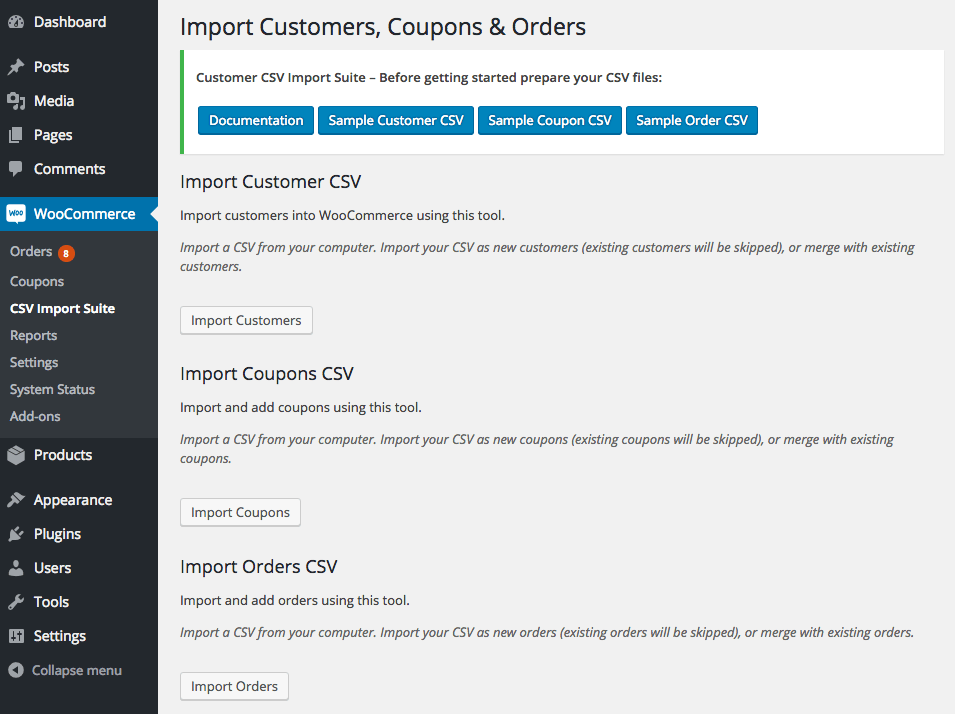
WooCommerce Customer / Coupon / Order CSV Import: Select import type
Main Import Screen

The importer is flexible enough to handle several kinds of import formats, and you can map your import columns to the appropriate WooCommerce data to merge or create customers, coupons, and orders. You can also import data from a variety of sources, such as an uploaded file, URL / file path, or via copy and paste.

What can the CSV Importer do?

  • Choose an import file location: upload your file, import from a URL / file path, or copy and paste import data NEW
  • Import customer data such as name, email, addresses, whether they are a paying customer, etc
  • Merge customer data from your import with existing users – useful for mass-updating customer information!
  • Import couponsall coupon fields are supported, including sale item exclusions and usage limits
  • Merge coupons – useful for mass-updating coupon data
  • Import order data, such as line items, linked customers, order totals, order notes, order numbers (works well when paired with the Sequential Order Number Pro plugin), and more
  • Merge order data to update totals, order status, or add meta in bulk such as tracking numbers NEW
  • Import custom fields (meta) for customers, coupons, and orders
  • Import custom taxonomies for customers, coupons, and orders if you have them added by plugins / third party code
  • Supports multiple shipping methods per order
  • Imports order data in the background so that you can import large sets of data without timeouts NEW
  • Flexible import format requires a minimum of fields to import, but allows fully defined customers, orders, and coupons
  • Fully compatible with the Order / Customer CSV Export extension

Import Process

The import process for customers, coupons, and orders is similar. You’ll first select your import file location.
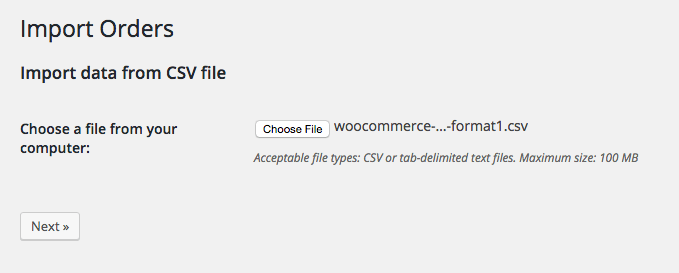
WooCommerce Customer / coupon / Order CSV Import: Select import file

Then you’ll select options for the import, and get a quick preview of your import file so you can ensure the plugin has detected the delimiter correctly. For any import type, you can opt to merge data, which will update existing records if they match, or only create data with each imported row.

WooCommerce Customer / coupon / Order CSV Import: customer import options
Customer Import Options

Next, you’ll map the columns in your import to the appropriate WooCommerce data. This lets you easily import almost any file format, so long as it contains the necessary information for import.
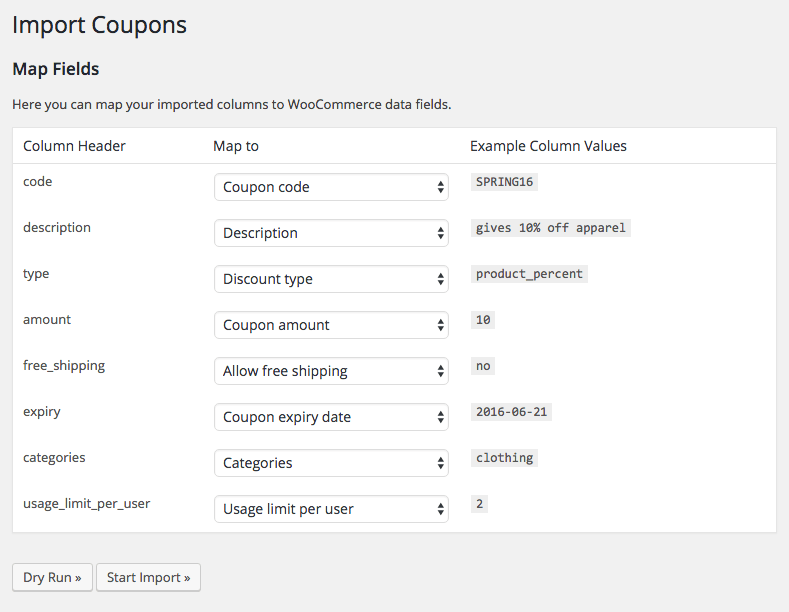
WooCommerce Customer / coupon / Order CSV Import: coupon import mapping

Finally, you can run a dry run to ensure your file will import safely, and do a live run. This will process in the background, meaning you can navigate away from the import page as it churns through your imported file, which can even be thousands of rows long!
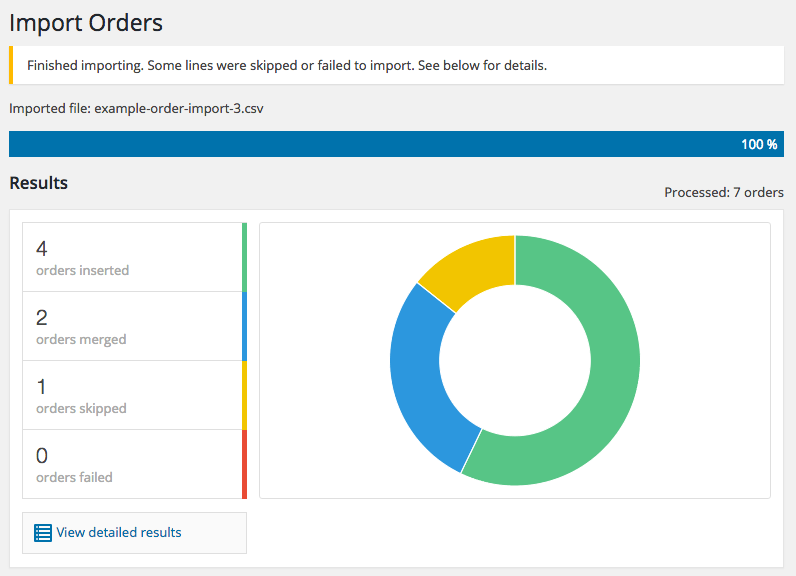
WooCommerce Customer / coupon / Order CSV Import: import progress completed

You’ll get a status update when the import is completed of how many rows modified data, were inserted, or were skipped.

How to Get Started (in 5 minutes or less)

  1. Buy this extension 🙂
  2. Download and install into your WooCommerce store
  3. Read the Documentation and download the sample CSV files to see the format required for import.
  4. Add your data to the CSV file, upload, and click import.
  5. That’s it! Sit back and enjoy your easily imported customers, coupons, and coupons!

Need any more reason to buy? When you purchase a SkyVerge-developed extension, you’re getting the highest quality extensions for your WooCommerce store. Gain peace of mind by knowing that when you purchase our products, your store’s performance is as important to us as it is to you.


Customer reviews

Average rating 3.2
9 reviews
5 stars, 44% of reviews
4 stars, 0% of reviews
3 stars, 11% of reviews
2 stars, 22% of reviews
1 star, 22% of reviews
9 reviews
  • Ricardo Franco
    Rated 1 out of 5
    Support
    Jul 22, 2025
    Support
    Support does not reply. Can´t update order status and can´t import coupons
    • SkyVerge
      Aug 4, 2025
      Hey there! I’m sorry that you’ve had a poor experience using our plugin. Thanks for taking the time to record your review for other customers to consider as they make their purchasing decisions.

      We strive to reply to each support inquiry within a business day, so if you haven’t received replies from us, please make sure to check your spam box and add our email address to your Safe Senders list. Would you please reach out to our support team again? We’ll be happy to help you! - B.G.
  • Jeannette Kershof
    Rated 5 out of 5
    Functionality
    Aug 5, 2024
    Functionality
    It is super easy to export your customers, coupons and orders from the old website to a new one with the export and import plugins. I had some issues, but the customer service is excellent, they helped me to solve the problem. Thank you!
    • SkyVerge
      Aug 22, 2024
      Hey there, thanks for the great rating! We are happy to hear that exporting and importing the data over to your new site went well with our plugins and that our support team was helpful in working out the issues. - S.M.
  • lorettastore
    Rated 2 out of 5
    Aug 25, 2022
    It has been close to impossible to use
    The orders I am trying to import into Woo from another platform will not import because there are required filed (not marked as required) that do not match up. After trying many workarounds, I contacted support about 20 hours ago, and haven't heard back yet. I did expect an email with a link to where I could check on progress, but that didn't happen either.
  • dabaman
    Rated 5 out of 5
    Aug 11, 2022
  • Ben
    Rated 1 out of 5
    Apr 23, 2021
    The extension doesn't work properly, it adds the products in as a new order. The support is incredibly slow and when they do reply it's one sentence, that is irrelevant and then you have to wait another day or two for the next sentence reply. Do not buy!! Complete waste of time and money.

Extension information

  • WordPress version required: 5.2
  • WooCommerce version required: 3.6.0
  • PHP version required: 7.4
  • Tested with WordPress: 6.9
  • Tested with WooCommerce: 10.4.2
  • Requires at least WordPress: 5.6
  • Requires at least WooCommerce: 3.9.4

Countries

  • Worldwide

Languages

English (United States)

Related Products

Price $29 annually
Rated 3.5 out of 5 stars
Price $109 annually
Rated 4.6 out of 5 stars
Price $119 annually
Rated 3.5 out of 5 stars
Price $279 annually
Rated 3.2 out of 5 stars
Price $59 annually
Rated 2.8 out of 5 stars
Price $79 annually
Rated 4.2 out of 5 stars
Price $49 annually
Rated 2.7 out of 5 stars
Price $199 annually
Rated 4 out of 5 stars
Price $49 annually
Rated 3.8 out of 5 stars
